
Introduction
A reliable office network is the backbone of any modern workplace. Understanding the fundamental principles of networking is essential for creating a system that supports daily operations without interruption. This involves grasping how different devices connect, communicate, and share resources to facilitate efficient workflows.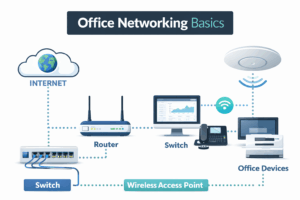
At its core, an office network comprises various hardware components such as routers, switches, and access points, which work in harmony to maintain connectivity. Familiarizing yourself with these elements will enable you to design a network that not only meets current demands but is also scalable for future growth.
Incorporating UniFi technology into your office network enhances its functionality and security. UniFi offers a variety of networking solutions that cater specifically to business environments, ensuring that your network can handle the demands of multiple users and devices seamlessly.
A successful UniFi network is built on several critical components. First and foremost, you will need a reliable UniFi controller. This software acts as the central hub for managing all devices within your network, providing insights into performance metrics, security configurations, and device statuses.
Additionally, choosing the right access points is vital. UniFi offers several models tailored for different environments, ensuring optimal coverage and speed throughout your office space. Combining these with high-quality switches will create a robust backbone that can handle high traffic without slowing down.
Moreover, don’t underestimate the importance of cabling. Proper cabling techniques not only affect the speed and reliability of your network but also its overall longevity. Investing in quality Ethernet cables can prevent common issues related to connectivity, ensuring smooth operations.
Setting up a UniFi network involves a series of well-defined steps. Start by installing the UniFi controller software on a dedicated server or cloud service, ensuring you have administrative access. This will allow you to manage settings effectively and monitor network performance.
Next, connect your UniFi access points and switches to your network. Use the controller to adopt these devices, a process that integrates them into your existing network setup. You'll be able to customize settings according to your organizational needs, such as creating separate SSIDs for different departments.
Once everything is configured, running a network test is crucial. This final step helps identify any dead zones or connectivity issues that may need addressing, ensuring your office network is as reliable as possible.
Even the most well-designed networks can encounter issues. Familiarizing yourself with common problems is essential for maintaining a reliable network. Slow internet speeds can often be resolved by checking the load on your switches and ensuring that your bandwidth is adequately allocated.
Another frequent issue is connectivity drops. This can be traced back to interference from other electronic devices or improper configurations within the network settings. Regularly updating firmware and recalibrating your settings can mitigate these issues before they escalate.
 In addition, consider the importance of documentation. Keeping a record of your network configuration and any troubleshooting steps taken will facilitate quicker resolutions in the future. This resource can be invaluable for both current and future IT personnel.
Conclusion
Designing a reliable office network using UniFi technology involves a structured approach that prioritizes understanding, components, setup, and troubleshooting. By following these guidelines, you can create a network that not only meets the immediate needs of your organization but also adapts seamlessly to future demands.