

Introduction
Small businesses increasingly rely on robust network solutions like UniFi to streamline their operations. However, many encounter pitfalls during deployment that can hinder their network's performance. Understanding these common missteps is crucial for ensuring a successful setup that meets the business's needs.
One prevalent mistake is inadequate planning before installation. Skipping the assessment phase can lead to improper placement of access points and insufficient coverage. Businesses should conduct a site survey to determine optimal locations for devices, ensuring comprehensive wireless coverage throughout the workspace.
Another frequent error involves neglecting firmware updates. Failing to regularly update the UniFi software can expose the network to security vulnerabilities and performance issues. Staying current with updates not only enhances functionality but also addresses known bugs, providing a more stable network experience.
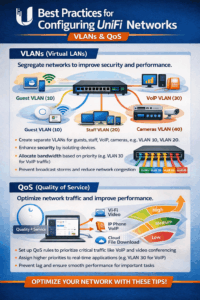
A well-configured network is essential for leveraging the full potential of UniFi systems. First and foremost, businesses should prioritize the configuration of VLANs (Virtual Local Area Networks). VLANs help segment traffic, enhancing both performance and security by isolating sensitive data from general user traffic.
Moreover, implementing proper bandwidth management can significantly improve user experience. Utilizing features like Smart Queues and traffic prioritization ensures that critical applications receive the necessary resources, especially during peak usage times. Without these configurations, businesses may experience slow connection speeds, frustrating employees and clients alike.
 Finally, regularly revisiting network settings is vital as an organization's needs evolve. As more devices connect to the network, adjustments may be necessary to maintain optimal performance. Regular audits of network settings can also help identify underutilized resources or areas for enhancement.
Despite best efforts, connectivity issues may still arise in any network environment. One common problem is interference from other wireless networks or electronic devices. Utilizing tools like the UniFi Network Application can help identify these issues, allowing businesses to adjust channels or frequencies to minimize disruptions.
Another frequent issue is inadequate bandwidth allocation. If certain applications experience slow speeds, it may be necessary to review bandwidth distribution. Implementing Quality of Service (QoS) settings can ensure critical applications receive priority bandwidth, effectively resolving performance bottlenecks.
Lastly, regular monitoring of network performance is crucial. Tools such as UniFi's insights and analytics can provide real-time data on usage patterns, helping businesses anticipate and mitigate connectivity problems before they impact operations.
Conclusion
To maintain a healthy UniFi network, businesses must commit to ongoing maintenance. Regularly scheduled reviews and updates can extend the lifespan of the network infrastructure and ensure it continues to meet evolving demands.
Routine firmware updates not only fix bugs but also improve security protocols, protecting the network from threats. Establishing a maintenance schedule can alleviate the pressure of reactive troubleshooting, allowing businesses to focus on their core objectives instead.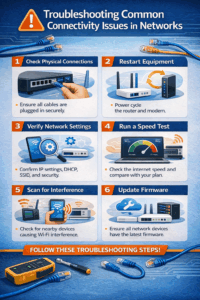
In addition to software updates, physical maintenance of equipment is equally important. Regularly inspecting hardware for dust accumulation and damage can prevent malfunctions. A proactive approach to maintenance ensures that the network remains reliable, ultimately supporting the business's goals.